
A platform switch rarely goes wrong on the go live date. Bookings go through, labels print, and the first few weeks look promising. The problem arises two months later when a B2B customer calls about a pallet picked up in March, and no one can find the booking because it resides in a system that has been shut down or is only accessible to one person with an old login.
The same pattern repeats when carrier invoices arrive. If you need to verify an invoice for the period leading up to the switch, you need the booking data that was stored in the old platform. If it has not been migrated in a searchable format, invoice verification is either dropped or handled manually by an employee who spends hours reconstructing something the system should have tracked.
Integration and switching booking platforms in practice is therefore just as much about what lies behind as it is about what needs to be booked tomorrow. The new platform may be faster and cover more carriers, but if the history is left behind, you have simply moved one problem and created a new one.
Why Historical Data Is Forgotten
When planning a switch, attention is focused on operations: Can we book with all our carriers? Does the platform communicate with the ERP and webshop? How long will it take to train the warehouse staff? These are the right questions, and they fill the entire project plan.
Historical data has no deadline. No one notices during the first week that the booking history from the last three years was not included. The need only arises when a claim, an invoice error, or a customer complaint needs to be traced back and by then, the project is closed, the consulting hours are spent, and the old contract is terminated.
There is also an ownership problem. Operations owns the bookings, finance owns the invoice reconciliation, and customer service owns the claims. History spans across all of them, which is why it often ends up on no one’s list.
Integration and Switching Booking Platforms in Practice Begins With a Data Audit
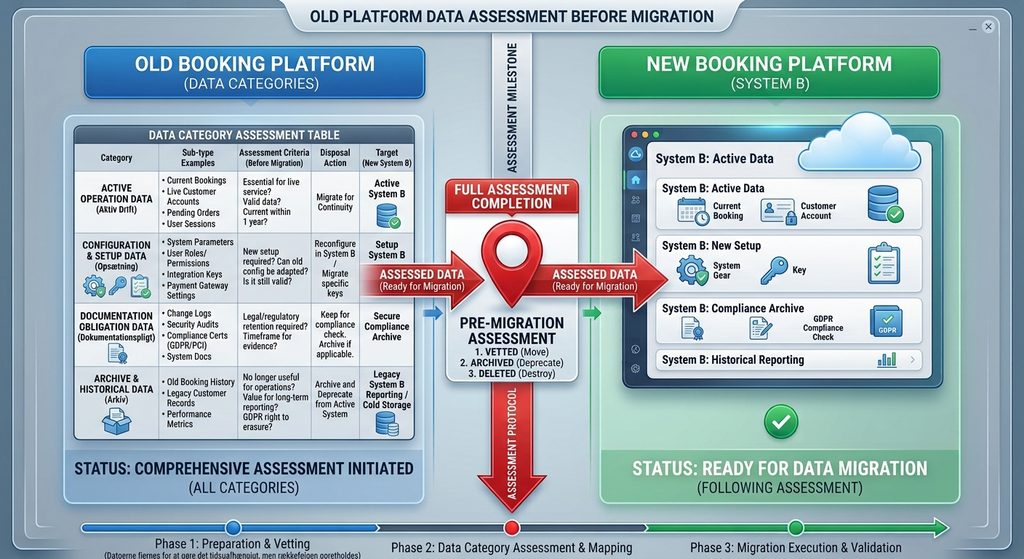
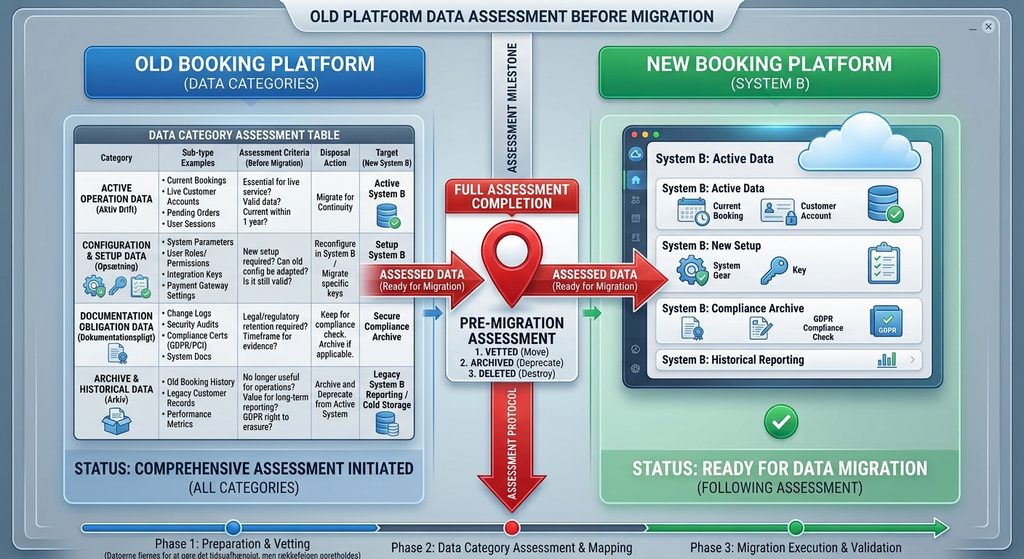
Before deciding what to migrate, you need to know what you have. A data audit is a simple overview of the datasets contained in the old platform, who uses them, how often they are used, and how long they must remain accessible.
The exercise typically takes half a day with the right people in the room, and it determines the rest of the project. Without it, data migration becomes a technical task defined by the vendor. With it, it becomes a business decision where you set the requirements yourselves.
Categorize the datasets based on their purpose:
- Active Operations: Data used daily that must work from day one. Customer and address directories, fixed pickup addresses, carrier account numbers, parcel and item types.
- Setup and Rules: Routing rules, service mapping, surcharges, price agreements, users, and permissions. This is where many underestimate the effort because the rules are rarely documented anywhere other than in the system itself.
- Compliance: Customs documents, consignment notes, proof of delivery, and invoice basis. Here, it is not your own needs, but legislation and customer agreements that determine how long data must be accessible.
- Archive: Booking history, resolved claims, and historical reconciliations. Must be searchable, but does not need to reside in the daily workspace.
Categorization makes it possible to prioritize. Everything does not need to be migrated into the new platform. Some data can reside in a searchable export archive, as long as you can retrieve it within a reasonable time.
The Data Most Often Missing Afterward
Experience shows that four types of data cause the most issues after a switch because they are not used daily and are therefore not tested during the implementation phase:
- Booking History With References: A booking without an order number, customer reference, and carrier tracking number is of little use. If history is migrated without the reference fields, you can see that something was shipped, but you cannot link it to an order or an invoice.
- Invoice Basis: If you reconcile carrier invoices against bookings, the underlying data must follow in the same level of detail. Otherwise, reconciliation stops at the cutoff date, and the preceding period becomes a blind spot where errors pass unnoticed.
- Claims and Damage Cases: Cases can run for months. Open cases at the time of the switch must have an agreed-upon home, and closed cases must be retrievable if a customer returns with a query.
- Documents, Not Just Data Lines: A consignment note or customs declaration is a file. Many data migrations transfer the database rows but leave the attachments behind because they are stored elsewhere.
How to Structure the Migration
The fear that a new system will disrupt operations for weeks is real, and it is one of the best reasons to plan data migration in phases rather than as one massive transfer the night before go-live.
- Establish the cutoff date and the rule for open shipments. Decide what happens to bookings created in the old platform but not yet picked up. The most operational model is to finalize everything created before the cutoff date in the old system, while creating all new bookings in the new platform. This prevents shipments with split history across two systems.
- Test on a subset first. Select one carrier, one warehouse, or a specific customer group, and run the entire migration on that subset. This helps identify field mismatches, incorrect date formats, and missing references while it is still inexpensive to fix.
- Verify using numbers, not guesswork. Compare the number of shipments, total weight, and invoice amounts per month between the old and new systems. If the numbers do not match, you know exactly which period and field contain the error.
- Run in parallel for a limited period. Maintain read-only access to the old platform while the new one handles operations. This is the period when most gaps are discovered because someone is searching for specific data. Secure a written agreement with the former vendor regarding how long access remains available and what happens to the data afterward.
- Freeze and archive. Once the parallel period ends, perform a full export in a format you can read independently without the vendor’s user interface. Files should be placed where finance and customer service can find them, not in a shared folder that only one person knows how to access.
How to Measure the Success of the Migration
A platform switch is often evaluated on freight cost alone. However, data migration impacts the metrics decision-makers are actually measured on.
Time to Ship from order placement to approved pickup decreases when address and customer master data are migrated correctly, as no one has to enter master data from scratch. The booking error rate follows the same pattern, as most input errors occur where data is entered manually rather than retrieved automatically. The cost per shipment is impacted by the internal labor hours spent reconstructing history that should have been migrated. Furthermore, B2B customer retention depends partly on how quickly customer service can answer a query regarding a shipment from several months ago.
Therefore, it is worth setting a few concrete success criteria for the data migration before the project begins. For example, ensuring that any random shipment from the past 24 months can be retrieved by customer service in under one minute, and that a carrier invoice from the period preceding the switch can be reconciled without manual lookup work.
FAQ
How many years of history should we migrate?
It depends on how the data will be used. For compliance data such as customs documentation and consignment notes, statutory retention requirements and customer contracts define the limit. For booking history and reconciliation data, a practical starting point is to look at how far back your claims and invoicing periods actually extend, then add a safety margin. Data that is never queried belongs in an archive rather than the daily workspace.
Can’t we just keep the old platform as an archive?
That can work during a transition period, but it is a solution with an expiration date you do not control. Contracts must be renewed, prices may change, and access disappears if the vendor retires that software version. Use the old platform to verify the migration, and ensure you end up with an export that you own and can read without relying on third-party software.
Who should own the data migration internally?
One person with the authority to prioritize across operations, finance, and customer service. If the task is delegated to individual departments, daily operational data will be migrated, while documentation and archives will be forgotten. The owner does not need to be technical, but must be able to decide which datasets to include and verify that control metrics match.
Data migration is the part of a platform switch that receives no praise when done right, but becomes glaringly obvious when skipped. It typically costs a few days of planning and a few weeks of parallel operation. In comparison, missing history costs labor hours in the years that follow every time someone needs to locate a shipment the system no longer recognizes.
To see how a switch can be structured in phases with realistic timelines, you can download the guide “What a Realistic Booking Platform Switch Looks Like.” It can serve as the baseline for your own project plan and help you set the right requirements for the vendor before signing the contract.
